Claude Code skill for TP-Link's Omada SDN
Cross-posted from the TPLink_Omada subreddit.
This morning I got curious about managing my self-hosted controller with Claude Code via the Omada API. After having Claude read through the manual and go through some trial and error it worked, but the experience was best described as clunky. Every API curl had to be manually approved and when I started a new session it had to go through the entire discovery process again.
I didn’t see a skill for this on skills.sh, so I had Claude make one by referencing the v6 manual and digging around the API on its own. The skill includes instructions for authenticating and then navigating the API. Rather than hard-coding any of the API info into the skill, it mostly relies on Omada’s built in Swagger (/swagger-ui/index.html) and OpenAPI (/v3/api-docs) endpoints for API discovery. It still flaps around a bit sometimes before it finds the exact endpoints and request format, but so far it is consistently figuring it out and doing what I ask.
In order to skip all of those manual curl approval calls, it also includes a short little bash script that can be approved once. I’ve been creating little helper scripts like this with several of the authenticated APIs I access frequently, and it’s a major QoL improvement. I asked Claude to generate a network topology using this skill and it generated an entire SVG diagram for me. Pretty cool.
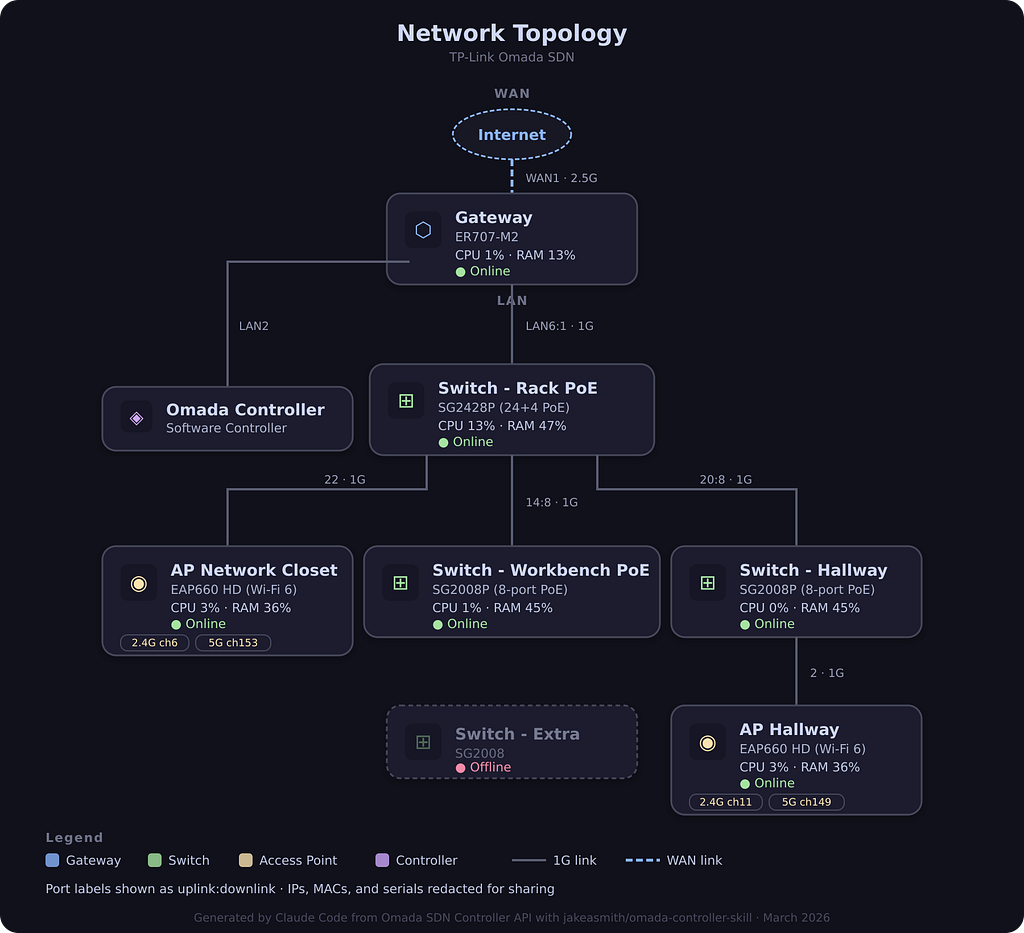
The skill is available on my GitHub (jakeasmith/omada-controller-skill), if you want to copy/paste it. If you’re cool with the skills.sh installer, you can use this one liner to download it.
npx skills add jakeasmith/omada-controller-skillIt expects a .env file with your client credentials, which you can get from Global View > Settings > Platform Integration > Open API.
OMADA_URL=https://omada.example.com:8043
OMADA_CLIENT=your-client-id
OMADA_SECRET=your-client-secret
I’ve only used it with Claude Code, but I think it should work with Cursor, Codex, and whatever else. Open to feedback if anyone gives it a shot.
P.S. If you’re just looking for a way to interact with the API via code without involving an AI, u/spectator81 recently shared a Node.js Toolkit for the Omada API that they created. Admittedly, I haven’t used it myself, but it looks promising and you should check it out!