Projecting creepy Halloween eyes onto my window with Home Assistant
Halloween is a big deal at our house. We go all out with the decorations and the costumes, so this year I wanted something new for the trick-or-treaters. What I ended up with is a pair of eyes, projected onto an upstairs window, that watch people walk up to the front door. I run them from my phone through Home Assistant.
The code is on GitHub if you want to steal it. It’s one static page of plain JavaScript (no build step, no images, no backend), and everything you see is drawn in code on a canvas.
The hardware is nothing fancy. The projector is something cheap I picked up on Amazon several years back. I did put that plastic window frost film on the glass to give it a better projection surface, and it worked really well.
What makes eyes creepy?
Before writing any code, I had a long conversation with Claude about why some eyes feel creepy and others just look like a decoration. Everything we landed on went into a SPEC.md that the rest of the project was built from. The best answer we found is that creepiness comes from not being able to read a mind. Something has to be clearly looking at you, and you can’t tell what it wants.
So the eyes had to look like actual eyes first. They have big off-white whites (that’s what people seem to key on) and a normal-looking iris, and then they behave just a little wrong. I saved the red-tinted whites for the rage mode. It’s the most unsettling thing in the toolbox, and I didn’t want to waste it.
I also kept them illustrated instead of trying for photoreal. A cartoon eye that moves right is a lot creepier than a realistic eye that moves wrong, which mostly just looks like bad CGI. And nobody on the sidewalk is going to see fine detail through a window at night anyway.
ℹ️ Each iris is generated from a seed, and the left and right eyes get different ones. Real irises are never identical, and it turns out you notice when they are.
Never sitting still
Most of the creep factor comes from tiny movements that run constantly, whatever mood the eyes are in. They twitch slightly about once a second, which is what your eyes do when you’re staring at something. They blink, with one eye a few milliseconds behind the other, because perfectly synced blinks look robotic. Every so often a blink holds closed for most of a second. And there’s a slow breathing motion on the lids.
My favorite detail is that people blink at the start of an upward glance, and almost never after. I’d never noticed that until I read about it. It took about six lines of code, and you’d only miss it if it weren’t there.
The “watching” mood blinks about 8 times a minute, which is around half of what a person does. It’s subtle, but it’s the one that gets under your skin.
Moods and tricks, on the keyboard
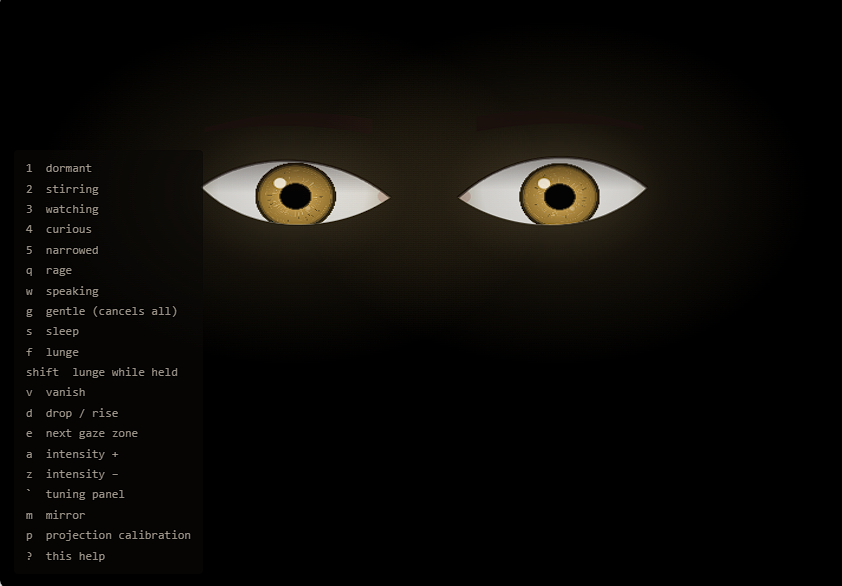
There are eight moods: dormant, stirring, watching, curious, narrowed, rage, gentle, and speaking. Speaking was a fun one. There’s no mouth, but the brows bob, the head nods a little, and the eyes glance away at the start of each “sentence,” all on the same rhythm. Somehow your brain fills in the talking.
Then there are three one-off tricks I can fire at any time:
- Lunge. The eyes snap to more than twice their size in about a tenth of a second, hold, and then slowly back off.
- Vanish. A fast blink to black, a few seconds of nothing, and then they open somewhere else in the window.
- Drop. They fall to the bottom of the frame, bounce a little when they land, and slowly rise back up.
The first version was controlled entirely from the keyboard, and all of that still works. Every mood and trick has its own key, plus keys for where the eyes are looking, how intense they are, a tuning panel, and the projector calibration. Press ? and it shows you the whole list.
That wasn’t good enough, so: Home Assistant
The keyboard is great while I’m sitting at the computer. On Halloween night, though, the computer is inside running the projector, and I’m out front in the dark with the trick-or-treaters. I needed to run the show from my phone.
The page connects straight to my Mosquitto broker over websockets and announces itself using Home Assistant’s MQTT device discovery. In Home Assistant it shows up as a single device with a dropdown for the mood, a few gaze zones, an intensity slider, and buttons for the tricks. I put the buttons I actually use on their own dashboard:
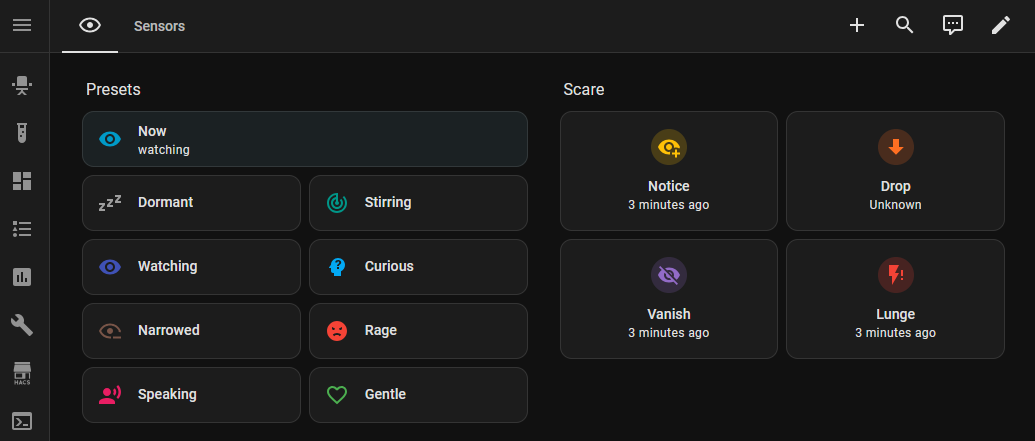
The eyes can also look toward a handful of named spots: sidewalk, walkway, porch, door, and away. This year there are no motion sensors involved. I’m running the whole show by hand from that dashboard. Hooking up sensors is high on my list for next year, though. It would be really cool to have the eyes follow people as they walk by.
What broke
Keeping the browser awake
The eyes need to run all night without the screen going to sleep. Browsers have a Wake Lock API for exactly that, but it turns out it only works on pages served over HTTPS. So I serve the page with tailscale serve, which gives me HTTPS on my tailnet for free, with no certificates to manage.
That fixed one problem and caused another. An HTTPS page isn’t allowed to open a plain ws:// connection, so the page could no longer reach my MQTT broker. The browser just blocks it, and the only clue is an error in the console. The fix was to proxy the broker through Tailscale too, on the same hostname:
tailscale serve --set-path /mqtt http://localhost:1884Now the page connects to wss://<host>.<tailnet>.ts.net/mqtt, and Tailscale handles TLS for both.
⚠️ Don’t put anything in the query string of that
wss://URL. There’s a known Tailscale issue where query parameters get stripped from websocket requests. Pass options through mqtt.js’s options object instead.
The projector isn’t square to the window
The projector sits off to the side and gets moved around, so the picture comes out skewed and spills onto the wall. I added a calibration mode: press p, drag the four corners onto the window frame, and the page warps itself to fit. Everything outside the frame stays black. Once the grid squares look square on the glass, press p again. The browser remembers it, so after moving the projector I only have to re-pin the corners.
![Calibration mode: a cyan grid warped into a skewed quadrilateral over the dimmed eyes, with circular handles on all four corners and the bottom-left handle selected. On-screen hints read: drag the corners onto the window frame; tab next corner, arrows nudge (shift x10); [ ] aspect 1.206 until the cells look square (shift: fine); r reset, p / esc done.](/blog/halloween-window-projection-home-assistant/2.png)
Wrap up
So that’s the whole thing. Here’s what it looks like walking up to the house:
If you want to try it, serve the repo as static files and open index.html. You don’t even need a broker. Just press ? and start spooking people.
That’s it for this post, but the projector isn’t going back in the box after Halloween. In December I’m planning to give the window a Christmas makeover. The bigger project on the horizon is projection mapping, though, and I can’t wait to write about that one.